Disclaimer: Because of the velocity of updates, some of the media assets of the Chat UI may be slightly out of date. You can view more updated assets in our Docs.
Today, we are rolling out improvements to our Chat experience across every axis, including Llama 3.1 70B and 405B based models, a context reranking system that outperforms state-of-the-art RAG approaches by 100%, and a large slew of UX improvements, from inline chat Citations to slash commands to deep insights.
Perspective
By November 2022, Large Language Models had already existed for a while. Chatbots had also been around for a while. So what made ChatGPT as massive of a breakthrough as it was? The reality is that it was a combination of improvements across the stack:
- Underlying model: ChatGPT came out simultaneously with GPT-3.5, a state-of-the-art model at the time
- Reasoning layer: Utilizing past questions and responses as state for future questions, allowing for more natural conversational “follow ups”
- User experience: Streaming tokens rather than waiting for the end of response token made the latency feel minimal
- Accessibility: Available via universally accessible web portal, not just by API
Conventional chatbots did not have a powerful model underpinning them, and LLMs did not have an accessible user experience that made them approachable and useful to every person.
At Codeium, we have always thought that ChatGPT was just a sneak peek into the potential of a chat experience, and that there is so much we can do across the chat stack, from model to user experience. ChatGPT required progress across the whole stack to be the step change it was, and we are one of the only fully vertically integrated code assistants. We believe we have leveraged this advantage to innovate on all axes to create another step change in the chat experience, specifically for developers. Today, we are unveiling these innovations across every aspect of Codeium Chat.
Underlying Model
Our perspective on models has always been to train our own proprietary foundational models for the very unique tasks for code, but to also provide optionality for large general purpose models where it makes sense to do so. Autocomplete is one of the applications where we train our own models from scratch, due to latency restrictions (and therefore model size restrictions) and code-specific features like fill-in-the-middle or full-repository context awareness. On the other hand, there is value in Chat for both smaller, faster models and larger, smarter models.
The Llama 3.1 family of models gave us a new option - large general purpose models that we could also control and improve upon, unlike API-based models like GPT-4. And this is exactly what we are rolling out. Today, we are deploying a Llama 3.1-70B based Codeium chat model for all users, and an additional Llama 3.1-405B based Codeium chat model for all paying users. The Codeium versions of these models are tightly integrated with our reasoning stack, leading to better quality suggestions than GPT-4 for coding tasks, and are hosted on our industry leading infrastructure so that we can offer them for free (or very cheaply) to our users. Both of these models are massive improvements over the previous Chat models for their corresponding users - just because 405B is the larger number, providing a 70B Chat model to over 600K users for free is a massive infrastructural achievement.
We are actively working on infrastructure tricks to provide a taste of 405B to all Individual users. For now, if you are an Individual user who wants access to the larger models, please join our waitlist. In fact, the more friends and colleagues you refer to Codeium from your referral portal, the higher up you’ll move on the waitlist!
As a summary, here are the models in Chat today:
Model | Speed | Quality | Access |
|---|---|---|---|
| Codeium Base ⚡️ Family of fast, high-quality models, including a Llama 3.1 70B based model. | Fast | Really good Integrated with Codeium’s reasoning engine and optimized for Codeium workflows | Individual, unlimited Teams, unlimited Enterprise SaaS & Hybrid, unlimited |
| Codeium Premier 🚀 Llama 3.1 405B based model. Biggest open source model on the market. | Medium | Best Integrated with Codeium’s reasoning engine and optimized for Codeium workflows | Teams, unlimited Enterprise SaaS & Hybrid, unlimited |
| GPT-4o OpenAI’s flagship model. | Medium | Between Base and Premier Good model but unable to be optimized to Codeium’s reasoning engine and workflows | Teams, unlimited Enterprise SaaS & Hybrid, unlimited |
Reasoning Layer
Models are important, but there are restrictions placed by context length limits. A million token context length corresponds to only around 100k lines of code, so we would not be able to fit the entirety of any reasonably sized production codebase into a single inference, even if we were willing to stomach the high latency and costs. Forget about past conversations and other potentially relevant data sources for Chat.
This is why a large differentiator between systems is the strength of the reasoning layer that can confidently tell what is relevant for a particular Chat question. Other tools rely on the open files, but everyone knows that code is very distributed, with relevant information in utility libraries, imports, headers, etc that are often unopened when writing new code. This is why we built a state-of-the-art context awareness engine that could reason over entire codebases, and even across repositories. This is a great article on how our context awareness engine differs from and outperforms naive RAG approaches.
Today, for Enterprise SaaS and Hybrid, we are rolling out our next generation retrieval engine, which has a Recall@50(1) that is 2x better than state-of-the-art embedding-based RAG systems. More to come on this, but we have fundamentally changed the paradigm on how retrieval and reranking can be done (hint: it takes a lot of compute). Simply put, all of our users will now get more relevant, grounded Chat responses.
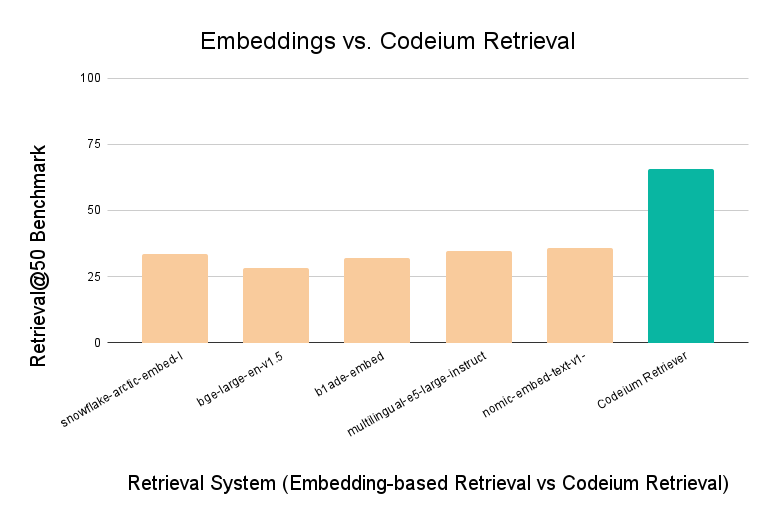
Codeium retrieval almost doubles the recall performance of leading embedding models.
User Experience
So far we have been talking about the invisible - how do we improve the underlying models and reasoning engines to get you higher quality results. But an API could theoretically do that. Codeium shines by marrying the state-of-the-art underlying system with an intuitive, powerful UX. We have historically done this in Chat with @-mentions, context pinning, custom chat context, and more.
Today, we are rolling out a large suite of UX features and improvements, available today on Visual Studio Code, Jetbrains, Visual Studio, Eclipse, and XCode.
Chat History
Pretty simple - continue past conversations and be able to quickly recall AI responses.
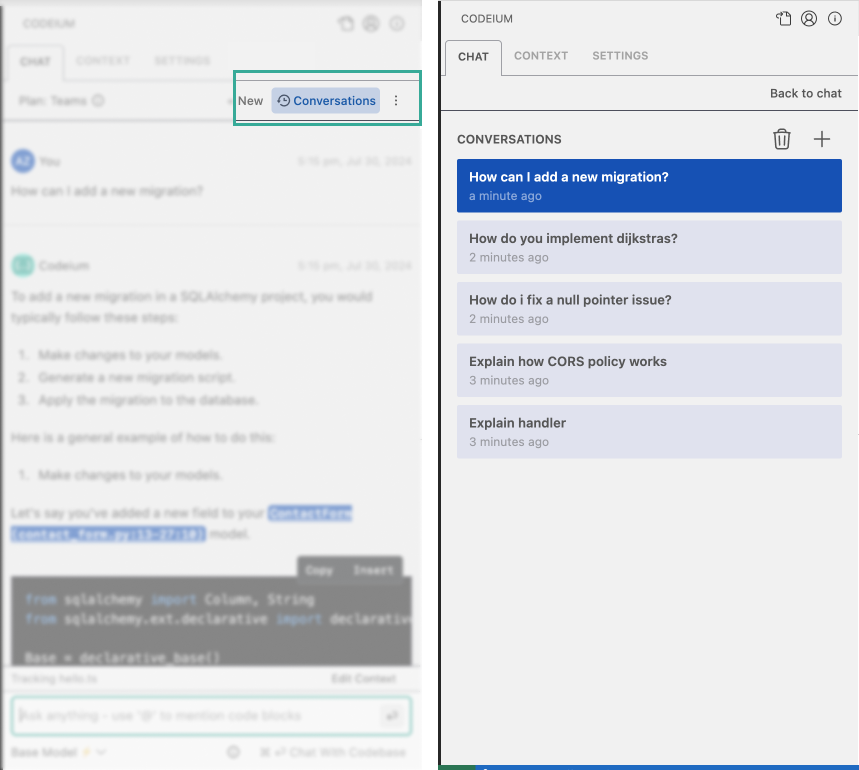
Click the Conversations button to see your past chats.
Inline Citations
Trust your Chat responses even more. We tell you which parts of the response are pulled from what context within your codebase, so that you know we are not hallucinating and you can verify against existing code.
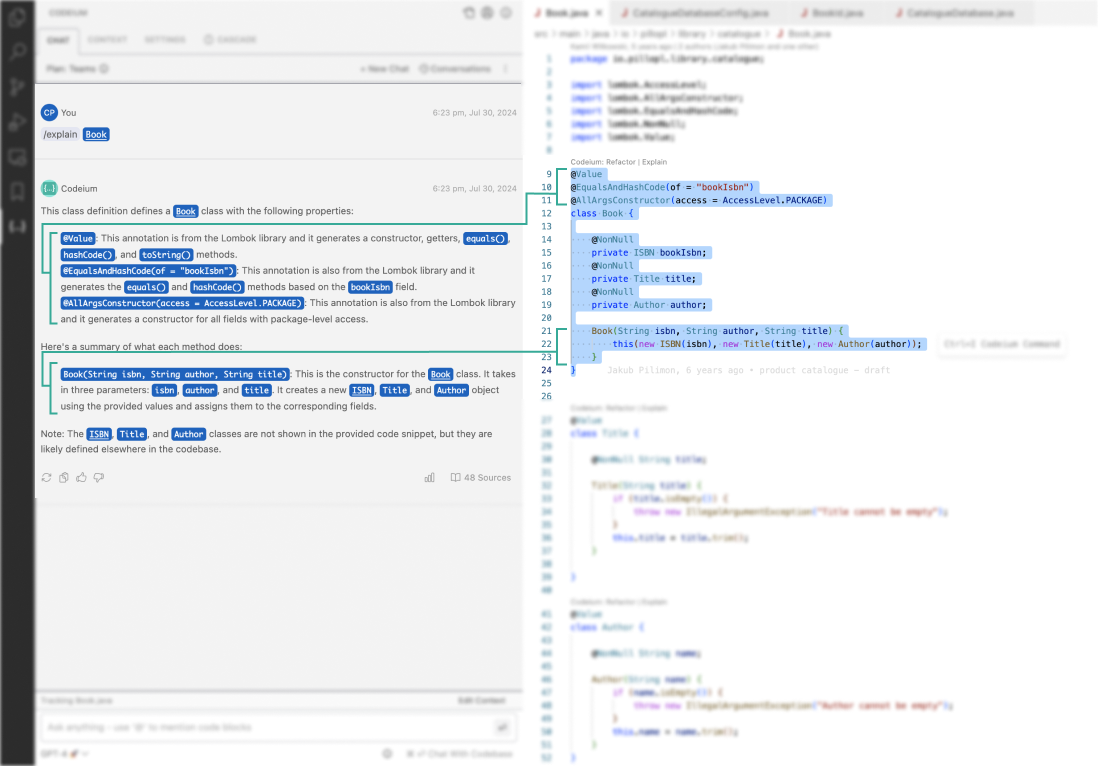
Click the links in the Chat response to be taken to the code sources.
@-mention Expansion
@-mentions used to only support repositories and individual contextual snippets such as methods or classes. Often, however, you know the relevant information down only to the directory or the file, and now you can @-mention them to help guide the AI with your human implicit knowledge and intent. This feature depends on the indexing setup on your IDE, and is available only on Visual Studio Code and Jetbrains.
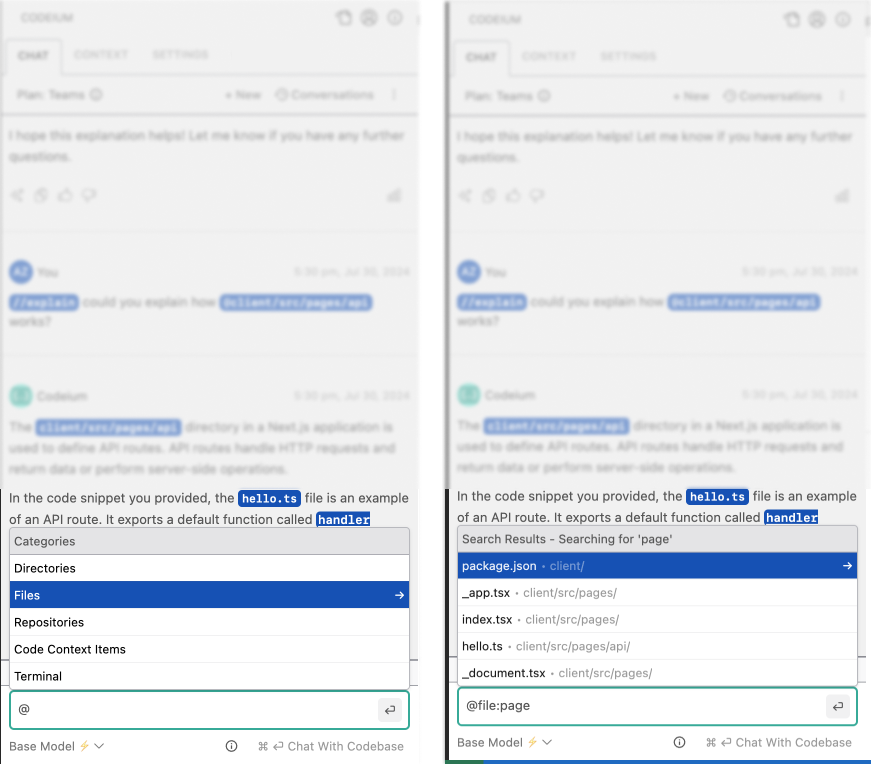
Use the @ symbol to specify relevant context items.
Slash Commands
Text-based triggers for common workflows, building on top of Code Lenses and right click dropdown on highlight. We are starting with /explain, but let us know what other common workflows you want wrapped in a slash command.
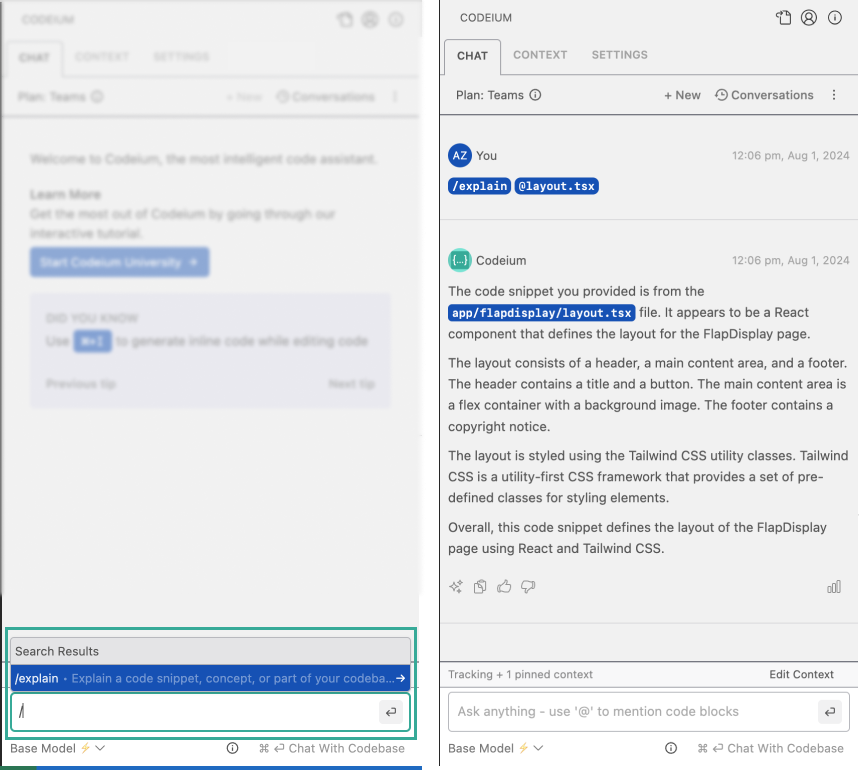
Using /explain with an @-mention makes it easy to trigger code explanations.
Inline Context Item Pinning
Sometimes while chatting, you @-mention a context item that you actually would like to pin and persist. Instead of needing to switch to the context tab, you can now directly pin the item from the Chat panel.
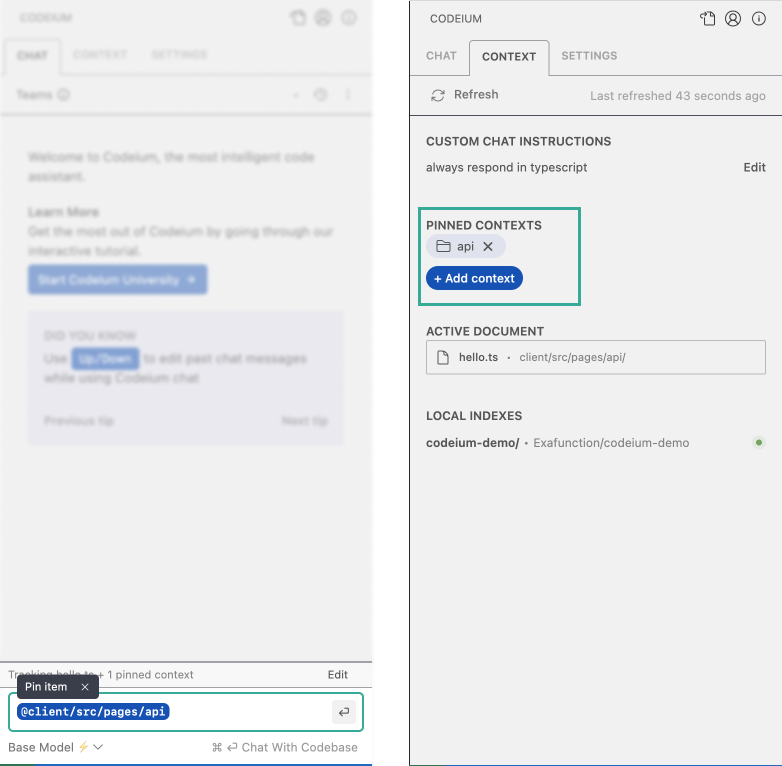
Pin a context item directly from the chat input so that it stays relevant in future conversations.
Chat Insights
Context retrieval, reranking, model execution? Lots of work is clearly going on under the hood for every Chat message, and now you can click the stats icon to see these statistics for yourself. Was context used? How long did the various stages take? How many context items were considered?
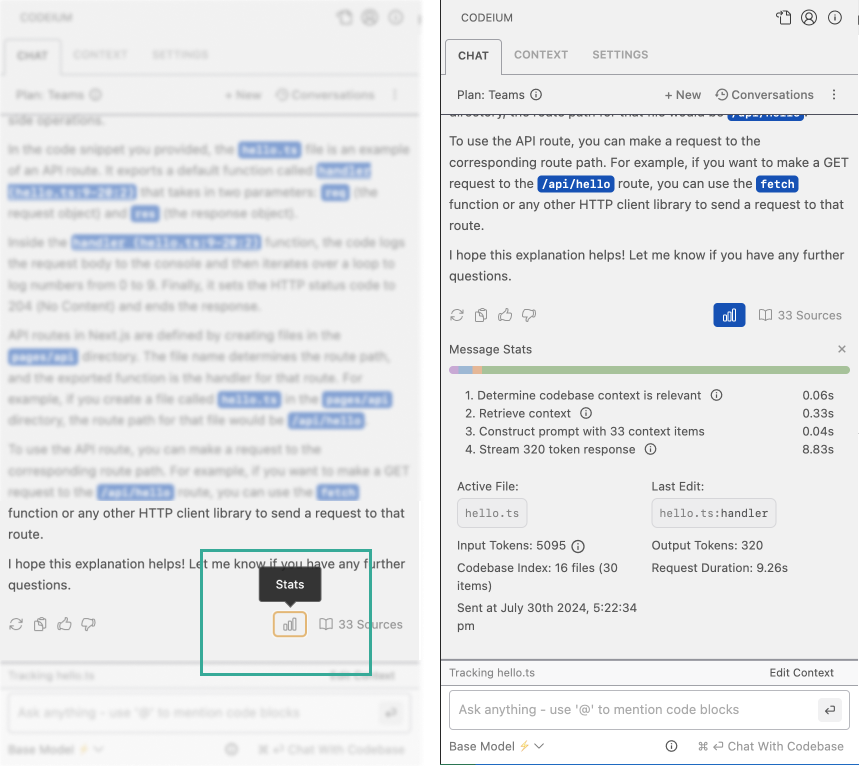
Click the graph icon to get detailed stats on your chats.
Rerun with Context and
Our system makes a judgment call whether a question requires context from the codebase or is just a generic question around software development concepts. However, if you want to force the use of codebase context, you can quickly rerun with context with a single button.
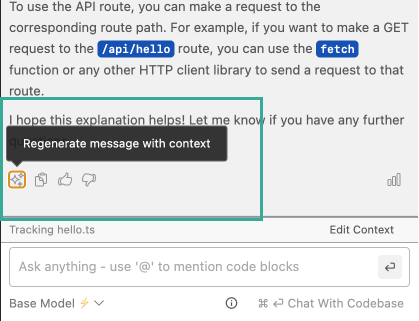
Click the magic icon to force the use of code context.
Copy to Clipboard
Right next to the magic icon is the clipboard icon. Taking a screenshot of a Chat conversation simply feels wrong - this is text after all! The copy to clipboard button copies the contents of the chat conversation into a pastable, human readable format.
Retry if Errors
We are pretty proud of our uptime, but there could always be transient errors that simply require you to retry. So we made that easy to do as well.
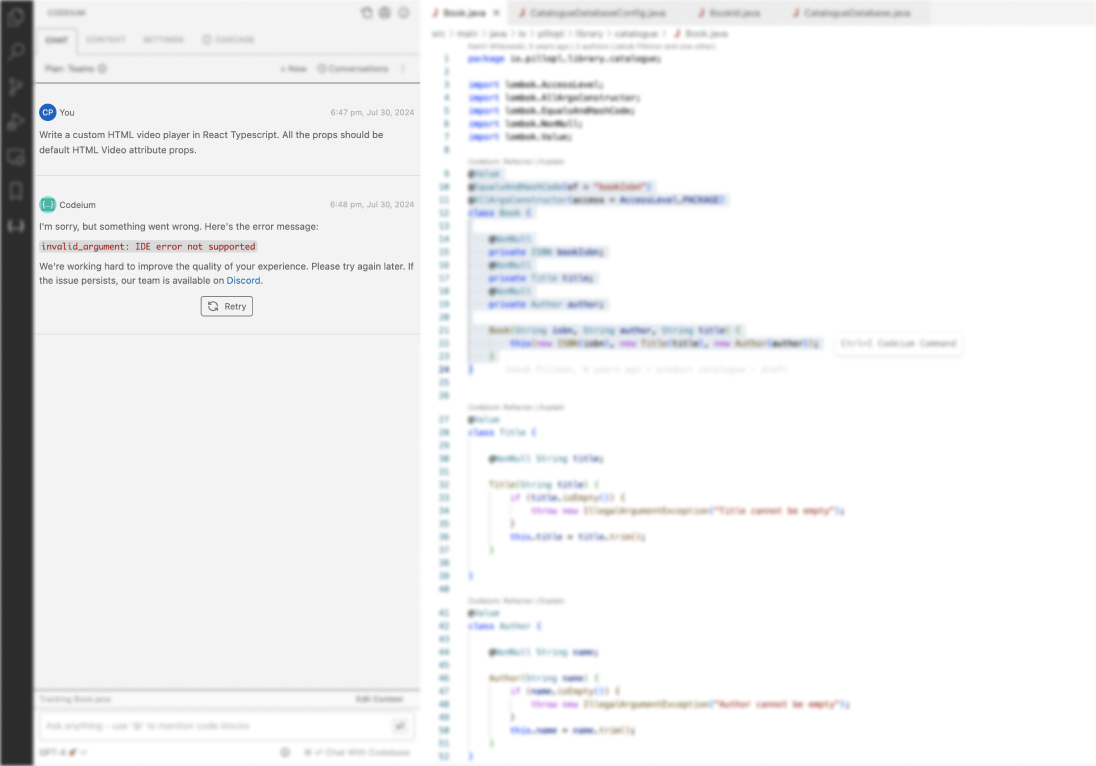
Click the retry button to overcome transient issues.
Overall Chat User Experience
We are continuing to iterate and innovate on the UX so that our users always have higher control, more insights, and smoother experience. See all of the features above and more in this comprehensive video:
Accessibility
By accessibility, we don’t count just bringing a chat window into the IDE as a breakthrough, though we have done so for more than just Visual Studio Code and JetBrains, which seems to be the extent for most code assistants. We’ve also brought it to Visual Studio, Eclipse, and recently, XCode. We even brought the Chat experience, grounded with our codebase awareness and reasoning capabilities, onto the web via Live, available for anyone to use upon up-to-date versions of many popular open source repositories.
On top of simply the IDE or web surface, we realized that even with the much wider exposure of ChatGPT, there were many people that could not use it for their work, especially in software development, because of (valid) concerns around IP security - sending code to third party servers, even if not persisted, is new exposure to risk. This renders Chat inaccessible to other AI code assistants due to their reliance on third-party SaaS APIs for model inference. Our breakthrough here was to leverage our multi-year head start in GPU and ML infrastructure to optimize the inference of our own code-biased Chat models. It cannot be understated the amount of work being done just to get utilization and latency at a usable and cost-effective state (read about some of the infrastructure tricks here), but that is what it takes to make Chat accessible to a brand new set of professional developers.
Conclusion
Codeium’s Chat experience is likely one of the reasons why developers on Stack Overflow self-reported Codeium as driving more productivity and satisfaction than any other tool, including GitHub Copilot and ChatGPT, and anyone who is aware of our history knows that these Chat capabilities are just a few examples of our velocity of innovation. Even more exciting capabilities are coming soon. Stay tuned.
(1) Recall@50 is a more representative benchmark for retrieval accuracy than needle-in-a-haystack tasks. For responding accurately, there are often a number of relevant snippets, not just a single snippet. Recall@50 captures this by measuring what fraction of “ground truth relevant” snippets exist within the 50 snippets that the retrieval system believes to be the most relevant. We will be talking more about flaws in existing benchmarks and this benchmark in a future post, just how we have historically talked about flaws in benchmarks and our approach.