tl;dr We introduce context pinning, a capability that allows developers to specify and persist known relevant information to Codeium’s context awareness engine. This is the next step in providing low overhead interactions that help developers help the AI.
Background on Context
As discussed extensively across many articles in this blog, our context awareness system, which precomputes indices of entire repositories to use for retrieval at inference time, is a crucial reason why Codeium can provide more grounded responses than systems that only reason about open files, such as GitHub Copilot. Due to our advanced parsing system that chunks code along semantic boundaries (classes, methods, etc), developers can uniquely guide the AI in our IDE-integrated chat with explicit @ mentions to code blocks that are known to be relevant to the question on hand (e.g. use @testing-utility-class to write a unit test for @function-name). With @ mentions, Codeium can pull these blocks of code to give answers that are often better than Codeium’s automated context retrieval system.
Why is this last statement the case? Well, it simply comes down to being able to encode more of the developer’s intent in the question. In a large enough codebase, there might be enough functions that do similar things or even classes and data schemas that have the exact same naming. If a developer is able to tell the AI more about which exact scopes of code they want to reason about, then our context awareness system can upweight those scopes of code in the retrieval and inference. This becomes more and more crucial the larger a codebase gets and how far away truly relevant context is from wherever the developer is currently navigated to in the codebase.
@ mentions are great for Chat, but what about autocomplete? When we code using some internal frameworks or central libraries, why can’t autocomplete be similarly guided? Or perhaps you are using chat, but you want to just make sure all answers are grounded in a particular framework, not necessarily that there are existing code snippets that you want to explicitly bring in? Or maybe you do want to always explicitly bring some code in as context, and @ mention-ing it on every single chat message is, for lack of better word, annoying?
Context Pinning
These are the motivations behind context pinning, which is exactly what it sounds like. With context pinning, a user will be able to pin any scope of code (repository, directory, file, function, etc), and this will signal Codeium to take code within this scope more seriously when giving answers, whether that is Autocomplete suggestions or Chat answers. A developer only has to pin this once for a particular set of relevant context, and it will persist while the developer is working. So if you know you are working with a particular framework or library, internal or external, you just need to pin it and Codeium will follow along. Just like @ mentions, this helps cut down the space of all potentially relevant code by helping the developer easily encode their intent to guide the AI.
What the developer should pin totally depends on how fine grained the developer themselves knows the potentially relevant code. Maybe you just know that you need to use this remote repository with common UI elements. Or maybe you know the subfolder of relevant UI elements. Or maybe you know the exact UI element file. All of these are pinnable, and if you have remote indexing and multirepo awareness enabled, you can pin information in remotely indexed repositories, not just the locally checked out code, which is what everyone has.
Context pinning is currently available for all SaaS users, Individual and Teams, starting with VS Code.
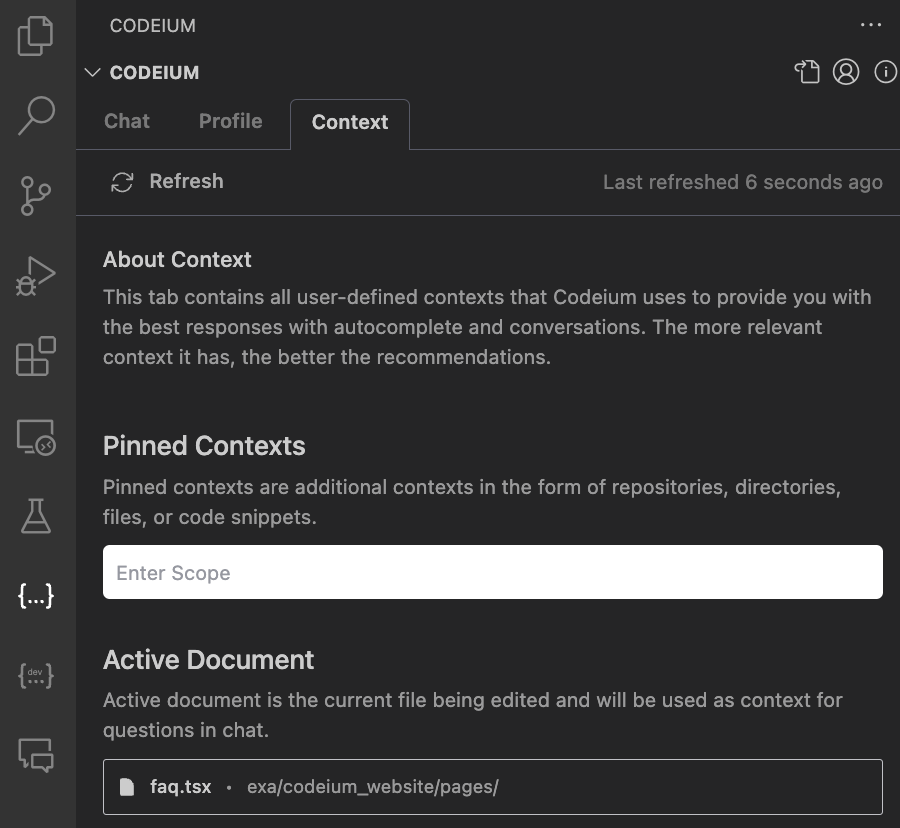
This is what the UX looks like in practice. We go to the context tab in the redesigned Codeium side panel:
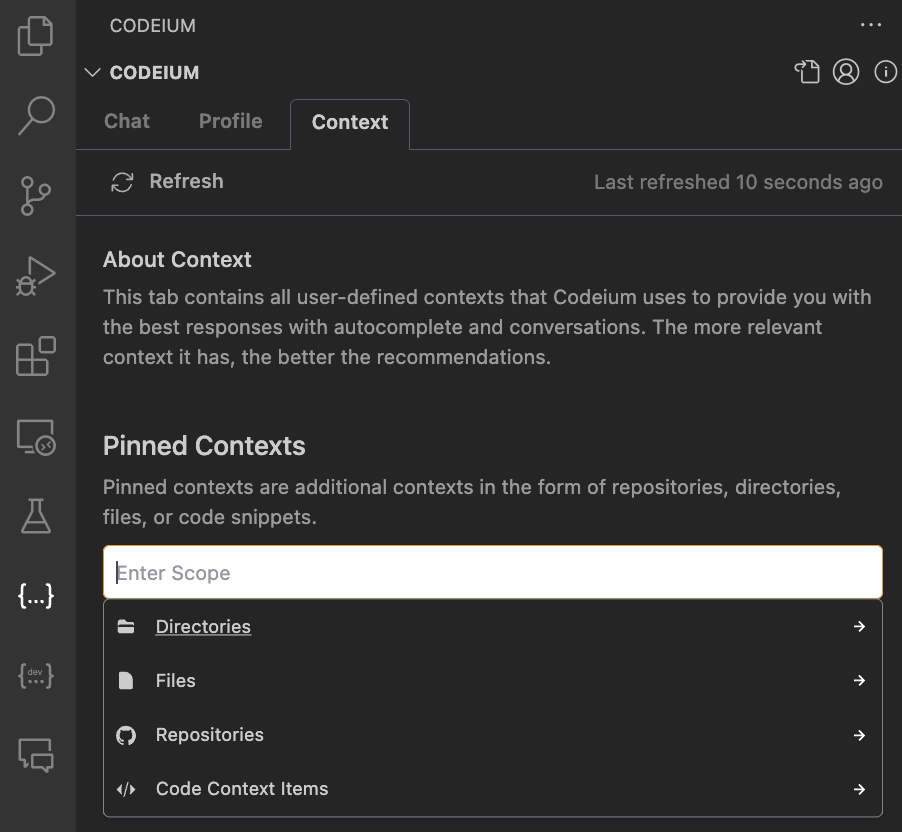
Then, when we click into the “Pinned Contexts” section, we see we get the option for pinning different scopes, such as directories, files, other repositories, or code context items (which is essentially a term encompassing particular classes, functions, etc, i.e. “sub-file”):
All you have to do is specify what scope (or multiple scopes!) you want to pin, press enter, and you will see that it is added to the list of pinned context items, such as our internal UI design system here (very useful when iterating on frontend!):
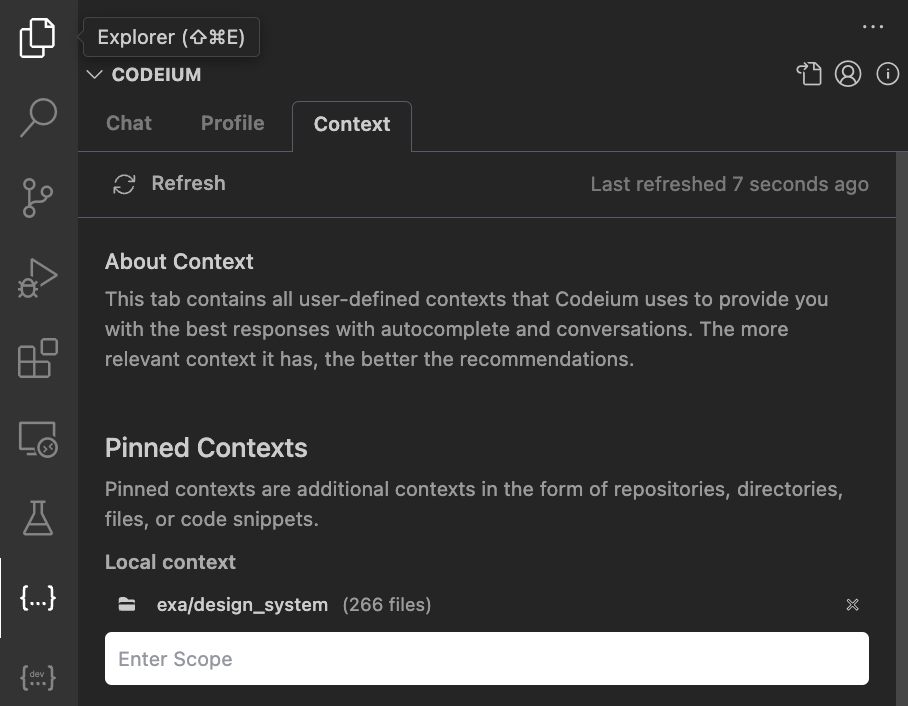
You will notice that we even show the number of files are included in the pinned context item - pinning more files does reduce the efficacy of context pinning because there is more the AI has to infer, but obviously, a developer wouldn’t always know exactly what code in a directory or repository is required for every particular task (otherwise we wouldn’t need AI!).
Context Pinning in Action
Let’s see this in action. For the first example, we will first ask Codeium to horizontally center a Button component:
Technically correct, but let us say we want to use Tailwind primitives instead. If we know we want to be developing with Tailwind, we can just pin the tailwindcss repository and ask the same question:
As we would expect, we get a working solution using Tailwind! By pinning the tailwindcss repository, we are pulling context from the most up-to-date version of Tailwind, even information that the underlying LLM did not train on due to training data cutoff dates. So, this is both an easier and a more accurate way of guiding the system than typing “Use Tailwind to […]” as prompt engineering in the chat panel.
The value is not just for frontend and external frameworks. You can pin anything, such as a file in the current repository if you know you will be using the contents in your current task. Here is a framework-agnostic example where we don’t initially get answers that match an existing class’s signature, but by pinning the file, the AI knows exactly what reference code to pull in to make a suggestion:
Next Steps
For transparency, there is still some tuning and polish to be done. How much do we weigh pinned context against other context sources? How do we communicate to the developer on how much their pinning has helped the AI focus its retrieval? How do we ensure that developers actively use this feature, as it is something that a developer does have to remember to use and isn’t completely passive like Autocomplete? These are the things we want to iron out so that this theoretically powerful feature actually drives the value that we are confident it can.
In the grander picture, this is another step forwards in making a powerful context awareness engine, not just because of the state-of-the-art retrieval capabilities, but also because the intent of the human developer is very consciously encoded and integrated into the system. Just like we believe developers should be using the superpowers of AI to be better developers, we believe the AI should be using all of the intent and knowledge that the human has to be a beter AI. This is just the beginning of what we have in store this year for reasoning about code at large enterprise-level scales.