Disclaimer: We develop the AI-powered coding toolkit, Codeium, but do not focus on Codeium in this post. This is an as-objective-as-possible assessment of GitHub Copilot for Enterprise given our expertise in the AI-for-software-development space.
As promised in GitHub Universe last November, the brand new Copilot Enterprise plan recently became generally accessible, and obviously, we got a lot of questions on what we thought about the new features, how it compares to the various Codeium enterprise offerings, and our plans in the future. So, instead of repeating ourselves over and over again, we will transparently write them all here! We will try to be objective (there are some features that are genuinely useful!), but will call out statements that do not make sense and expand where the story is incomplete.
At a high level, Copilot Enterprise is a SaaS plan that comes at $39/user/mo and requires GitHub accounts, as compared to the existing Copilot Business plan, which is also SaaS and requires GitHub accounts, but is only $19/user/mo. The price difference is of course due to the expanded feature set so let us just look at each feature one-by-one as promised by Copilot Enterprise:
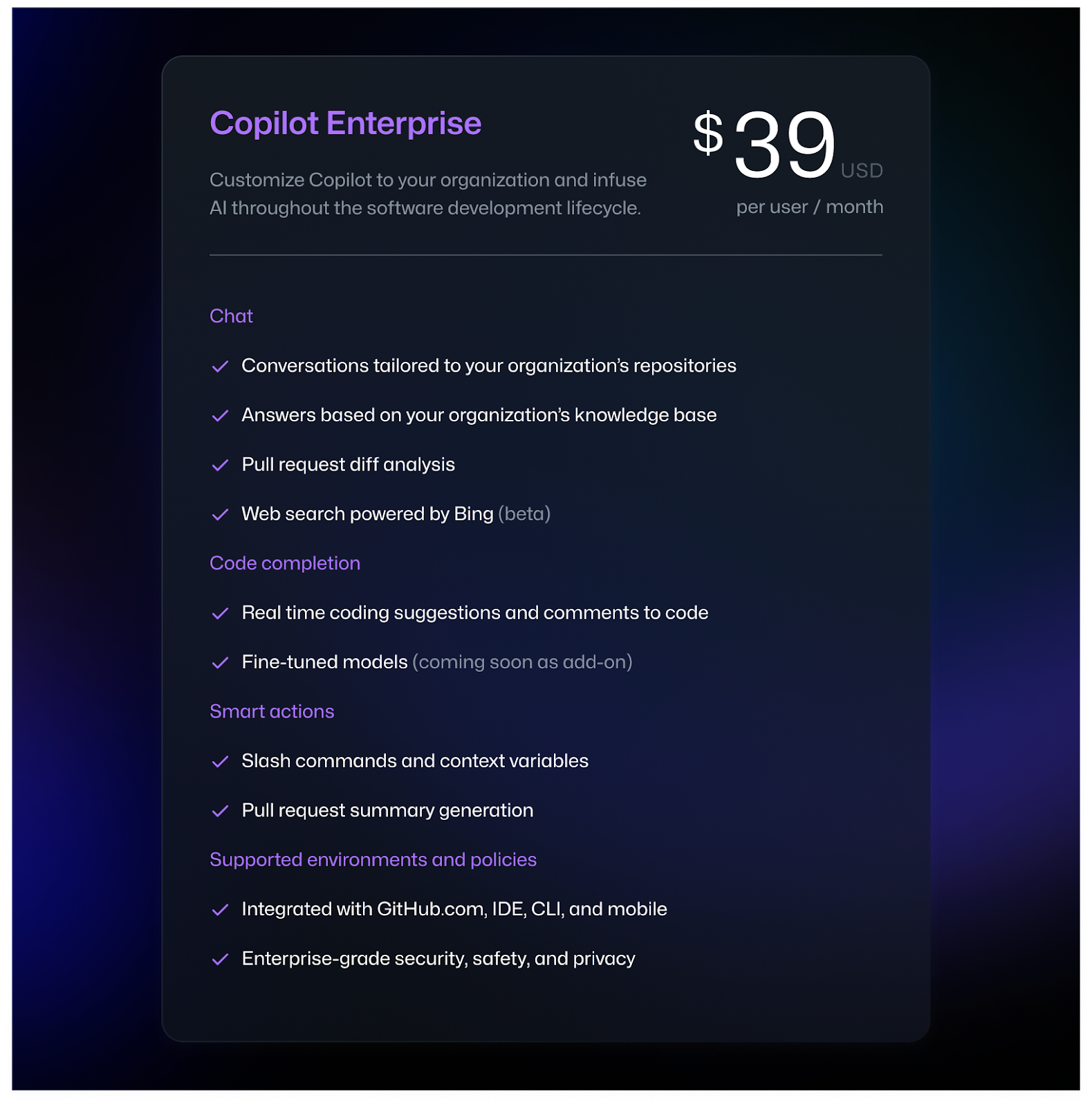
One last thing on the price side before diving in - GitHub Copilot Enterprise requires you to have GitHub Enterprise licenses on the SCM side, even if you don’t store your code in GitHub. This comes to an additional $19/user/mo, so if you are not already on the GitHub Enterprise plan, you should plan on GitHub Copilot Enterprise costing $58/user/mo.
Chat
- Conversations tailored to your organization’s repositories
- Answers based on your organization’s knowledge base
We will group these two together, because under the hood, this data-level personalization is similar to our context awareness engine. GitHub will parse and index your source code so that it can retrieve useful snippets at inference time, thereby grounding responses more to what already exists. We found that when we launched our first version of our context awareness engine, the raw amount of code accepted increased by 27%, so GitHub Copilot is finally going to see this benefit, a genuinely useful feature. The catch? This will only work if your code lives on github.com as the SCM (not even self-hosted GitHub!). We also don’t know how much awareness this engine has, and we know that we have had to go through many iterations to be able to support full repo context awareness and even multi-repo context awareness, but we will give them the benefit of the doubt. Great feature!
- Pull request diff analysis
We will talk about this when we talk about “Pull request summary generation” under the “Smart Actions” section.
- Web search powered by Bing
This is actually an interesting feature on paper, but we are curious on how useful this will actually be or if it is more of a feature gimmick. We have given this idea some thought before, and we came to the conclusion that if someone just wants to ask general questions not related to a particular codebase, they should just use a normal web search tool like Bing (why do you need a search bar in the IDE?) but if you want to have the answers grounded in the codebase, then you should probably use a context awareness engine with an up-to-date index to underpin the search rather than a Bing API, which is exactly what Codeium Live does. We shall wait and see!
Code Completion
- Real time code suggestions and comments to code
Well, this is just autocomplete, which has been there the whole time. Nothing new to see here - autocomplete is indeed very useful, but not specific to the Enterprise plan!
- Fine-tuned models (coming soon)
This is coming soon, so we cannot really comment on how or how well Copilot will do finetuning. Given that they have also created a context awareness engine, we are going to assume that Copilot is talking about actual model finetuning, which is a much better use of the term than tools such as AWS Codewhisperer, which use the term “finetuning” to really refer to context awareness (we know, it is confusing…).
Some things we will guess: it will also be SaaS so all of your code will have to be available to GitHub in the cloud (again probably github.com specific), and it might end up being a consulting-like play, where you have to pay extra to have GitHub train a specific model for you. Also, I wonder if GitHub will eventually learn what we have learned about model finetuning - it is really helpful to teach the base model how new languages or DSLs work, but less good at “retrieval” than a context awareness engine, which is built entirely to do retrieval. If a base model has been trained on tens of billions of lines of Python, more lines of Python, even if hundreds of millions, won’t really move the needle…
Smart Actions
- Slash commands and context variables
A less fine-grained version of @ mentions, but still cool nevertheless that with Copilot you can now guide the AI a bit more than before. The fact that you cannot reference individual methods or classes suggests that the context awareness engine might not rely on smart AST parsing or other techniques where the chunks of code are stored in referenceable, semantic blocks, but perhaps that is coming soon!
- Pull request summary generation
Along with the pull request diff analysis capability mentioned early, the UX actually looks quite nice! Definitely a lot better than what they had in CopilotX a year ago, primarily because Copilot does not just auto-generate the summary - they allow the author to edit.
But that is where the positives stop. PR summaries should not just have what the change is, but also why the change was made and maybe what the design decisions were. We don’t think that PR summaries are necessarily the right place for AI to first help the PR review process. Also, the example shown in the launch was for a change with just 11 lines added and 2 lines deleted in the diff! Such a gigantic block of a summary for such a small, simple change doesn’t feel like an actual productivity win, and doesn’t really add confidence that Copilot is able to reason about intricacies of context when it comes to even marginally more complex changes. Our big worry is that the underlying AI is still not that good, the summaries will be incomplete, and user trust will be eroded, leading to a feature that has a slick looking demo, but not any real value.
Supported environments and policies
- Integrated with GitHub.com, IDE, CLI, and mobile
Well, if it wasn’t clear before, it is now. Clearly GitHub Copilot is prioritizing GitHub.com customers, and it totally makes sense - use Copilot as a reason for capturing more companies into the full GitHub ecosystem. However, Source Code Management tool migrations are incredibly painful experiences, and there are other AI tools, like Codeium, that already integrate with Gitlab, Bitbucket, Perforce, Gerrit, and more (not to mention GitHub self-hosted!). This also shows that GitHub is doubling down on their SaaS deployment for Copilot, while tools like Codeium also support hybrid deployments to match the security posture that companies have with respect to their code.
Also, the story is incomplete on IDE support. Sure Visual Studio Code and Visual Studio (both Microsoft products) are well supported, but other IDEs - not so much. JetBrains chat was finally launched many months after Visual Studio Code and Visual Studio, which goes to show GitHub Copilot’s priority for these other IDEs. There is no Eclipse or Jupyter notebook support at all, and subpar experiences on everything from XCode to Vim/Neovim. This is even more stark when compared to a tool like Codeium, which has base autocomplete support for all of these IDEs and more functionality available on more IDEs across the board.
- Enterprise-grade security, safety, and privacy
We will call out GitHub on this. GitHub Copilot is a SaaS tool - enterprise-grade security means at least SOC 2 Type 2 compliance. But according to their own trust center:
Copilot is not currently included in GitHub’s existing audits and certifications, including SOC 2, ISO 27001, and FedRAMP Tailored. Compliance at GitHub begins with good security, so our first focus is fully onboarding Copilot to GitHub security programs and tooling. GitHub is engaging with a third-party audit firm to perform a gap assessment of Copilot as part of readiness activities for SOC 2 Type 1 (security criteria) and ISO 27001, with a goal of having the full audits for code completion by May 2024, and will start onboarding new Copilot GA’d functionality on a 6 month cycle starting in November 2024.
A bunch of other code assistants, such as Codeium, are SOC 2 Type 2 compliant, so it is hard to claim that GitHub Copilot is equally “enterprise-grade.”
The other security claim that Copilot likes, especially in their trust center, is that they have a post-generation filter that “targets the most common vulnerable coding patterns, including hardcoded credentials, SQL injections, and path injections.” In case you missed a previous post, they don’t.
And on the safety side, Copilot is still being sued for training on non-permissive code, such as GPL code, because the underlying models trained by OpenAI use the OpenAI Codex dataset, which contains such code. As a reminder, GitHub does not control the underlying models, and so does not have the power to iterate on these compliance issues.
Closing Thoughts
Context awareness definitely is a step forwards, the value of Bing chat and their PR features are yet to be seen, and the lack of support for enterprise environments and dev stacks is a clear negative. Overall, is it worth $39/user/mo? Probably, but all AI assistants are underpriced given how much value they end up driving. Still a lot of big meta questions though.