This is the final day of a week of Wave 8 updates, but we hope to close out strong!
Today’s theme: UX Features + Plugins Update.
The quick tl;dr on the Plugins end is that we are bringing a number of highly requested features to Cascade within our JetBrains Plugin:
- Memories: Cascade remembers important information for future steps
- Rules: In the original .windsurfrules file approach to guide the AI
- MCP Support: Connect Cascade in JetBrains to MCP servers
And for the UX features:
- Continue button: Simple button to tell Cascade it is on the right track when it pauses for feedback
- Redesigned model selector: Better organization of all of the premium models available (and some opinionation on which ones work best for Cascade currently)
- Workspace to conversation mapping: Better handling of when past conversations happened in different workspaces
- Miscellaneous UX improvements: improved code block UX, hunk navigation improvements, ability to edit suggested terminal commands, and the ability to propose new files in Chat mode
As launched in Wave 7, our Cascade integration into JetBrains is an important piece for providing the best AI experience possible given the constraints of each editor platform.
And the UX features? Well, these are a laundry list of UX features that aren’t necessarily groundbreaking individually, but continue to reinforce our core tenet about being very intentional with UX and making sure we keep on refining the experience to maximize the power and smoothness when using our tools.
JetBrains Plugin Updates
In Wave 7, we launched Cascade on JetBrains in a form very similar to the original launch of Cascade within the Windsurf Editor back in November, but we promised to quickly bring in a lot of the capabilities launched in subsequent Waves. For this Wave, we have brought in some of the more highly requested ones - Memories, Rules, and MCP support.
Memories provide Cascade the ability to learn from conversations and store important information that can be retrieved later:
The version of Rules that we have brought in is the original .windsurfrules implementation, not the Rules implementation we introduced yesterday as part of Wave 8, but it is still highly effective in providing guidance to Cascade:
And finally, we have brought the original implementation of Model Context Protocol (MCP) integration, where you can connect locally-running MCP servers to pull from arbitrary data sources:
As you can tell over the last couple of days of Wave 8 announcements, we have brought a whole host of new capabilities to the Windsurf Editor, and for full transparency, they are not available to the JetBrains Plugin yet. A lot of them have been launched in beta because we don’t fully understand whether or not they will have real impact, and we are still tweaking the UX of the rest to figure out the best experience. Instead of having multiple implementations across the Editor and the JetBrains Plugin that we would have to keep in sync during this experimentation phase, we will wait to finalize on the Editor before bringing the capabilities to the JetBrains Plugin.
Continue Button
As a collaborative agent, after a large number of steps, Cascade will pause and ask the user to prompt again to provide feedback or to confirm that it is on the right track. This has not changed. However, we’ve now added a button for the latter case if you just want to continue.
Note that each feedback to Cascade after it pauses, whether to redirect or continue, does cost a user prompt credit, even if using the new continue button. This behavior has not changed, and normally happens at ~20 steps.
Redesigned Model Selector
There are a lot of models now, and the foundation model labs are churning them out at breakneck pace. In order to keep our model selector organized, we have redesigned the UI to make it easier for you to find the model you are looking for by provider or cost, or to get our recommendations:
Workspace to Conversation Mapping
Before this Wave, the conversation history contained all conversations you had across all your workspaces. Now, we have a dropdown that allows you to filter to just the conversations in the current workspace:
Also, now if you try to open a conversation that happened while working in a different workspace, Cascade will prompt asking if you would like to open that workspace so that any file references and inline citations are still accurate:
Miscellaneous UX Improvements
There’s a whole host of other small but consciously decided UX improvements.
Very simple, but now code blocks now match better with themes:
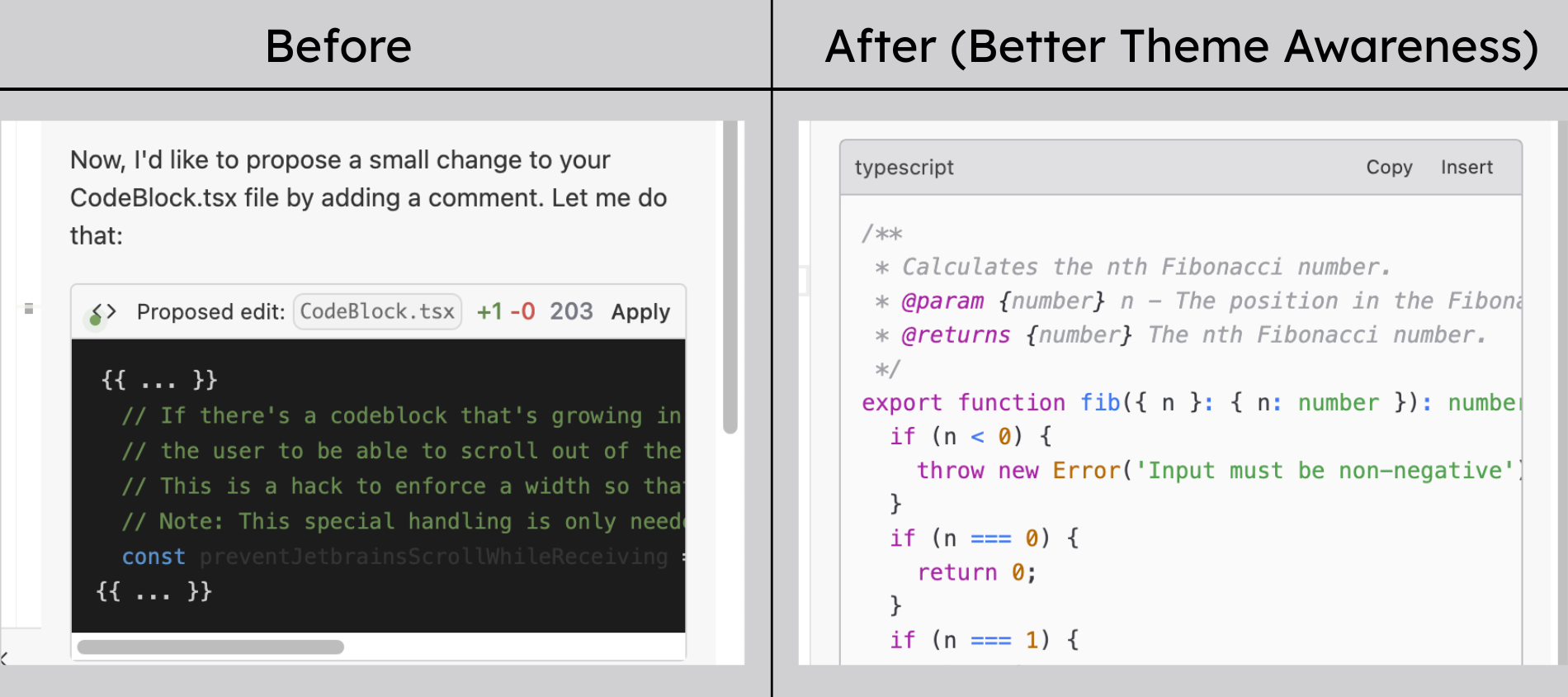
We made small improvements to the user experience for handling blocks of code changes, focusing on the active “hunk” within the file and allowing to collapse the accept/reject overlay:
Users can now edit a proposed terminal command before accepting it, in case the command is close but not completely there:
And in Chat mode, if Cascade suggests adding a new file, it will actually propose the contents of the new file as opposed to just erroring out because it did not have access to the add_file tool (as in Write) mode:
With these updates, Wave 8 is complete! With how much we have in development right now, we would not be surprised if every future Wave will need to be released over multiple days, but we enjoyed this one. Hopefully more than just the new features, you learned a bit more on how we categorize and plan our product development. Everything you have seen us launch so far have not been arbitrary, they are all consciously chosen.
For the themes of this Wave, we:
- Solve for problems that we see primarily in engineering teams, as opposed to individual developers (Day one)
- Allow all types of developers to customize the very powerful generic AI platform to be maximally effective for their particular tasks and use cases (Day two)
- Improve the experience across our product surface, including the Plugins (today)
- Make the UX cleaner, smoother, and more intuitive (today)
We have a lot of planned follow up content and materials to help share what is now possible with the features that we released in Wave 8, but for now, check out our docs for details.
Surf’s up.