The vibes are high with this Wave, headlined by a capability that brings the best of AI-assisted app building tools into an IDE.
The tl;dr highlights of Wave 6:
-
Deploys: A single click is all it takes to package and share your Windsurf-built apps on the public internet
-
Enterprise access to MCPs, Turbo Mode, and more: All introduced in previous waves, now available to enterprises (with admin control in place)
-
Commit message generation: Single button to summarize current diff
-
Conversation Table of Contents: UX for easy access to past messages and revert capabilities
-
Long conversation performance: Reduced degradation of response quality the longer that a Cascade conversation goes
-
Tab improvements: context includes user search, Jupyter Notebook support
-
Miscellaneous improvements: MCP SSE support, a couple new icons, ability to edit suggested terminal commands, and more
Let’s start with the headliner…
Deploys
When we introduced Previews in Wave 4, we made it possible to seamlessly iterate on an application locally, but we did not streamline the process of taking that great work from local to publicly shared.
Deploys solves that problem, completing the full lifecycle of AI-assisted application development. With Deploys, we make it incredibly easy to deploy a website or Javascript web app project to a public domain in a standard manner, maintaining this URL even with future iterations.
In this beta launch, we are working with Netlify. All users have a rate limit of 10 deploys per hour, with free users allowed 1 new site creation a day while paid users are allowed two. It doesn’t matter if these are a new project Deploy or an update to an existing project; we have these rate limits to prevent abuse (read more about rate limits in our docs).
All you have to do to kick off a Deploy is to click the new “Deploy” rocket icon or ask Cascade to deploy the site:
These deploys can also be claimed to your own personal Netlify account, allowing you to change the domain name or further customize the deployment. Again, to prevent abuse, we will take down unclaimed deployments within a few hours. Claiming is also very simple:
Finally, it is easy to see all of your past deployments and their statuses on our website:
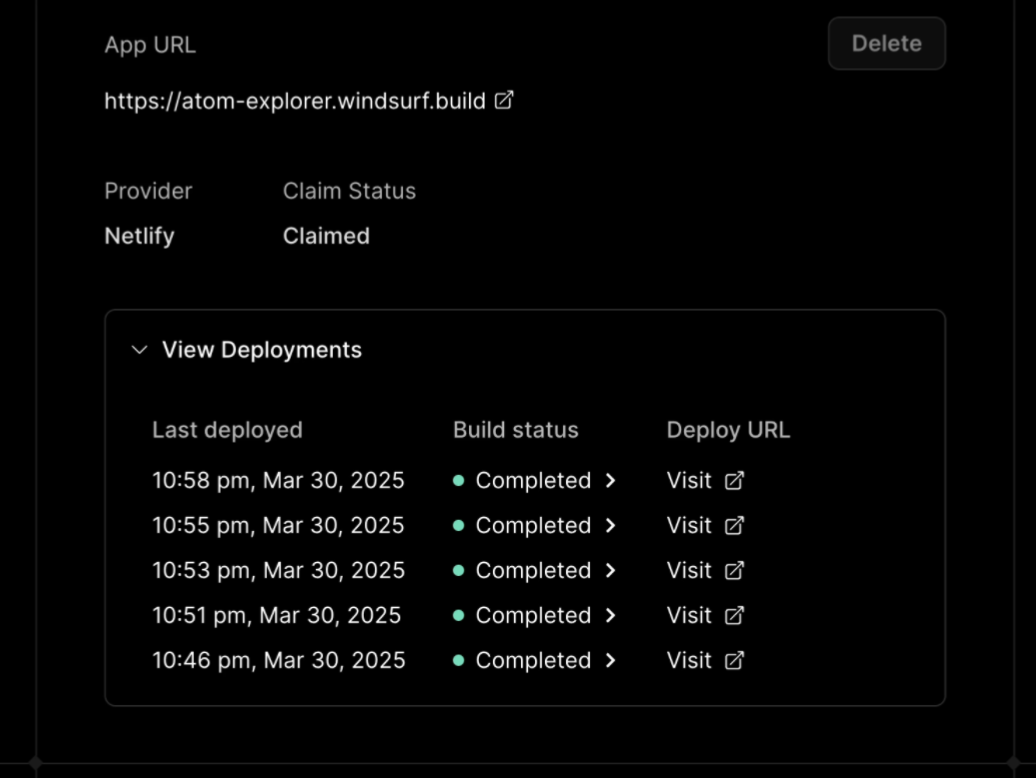
Past deployments and their statuses on our website
This is all possible with a new series of tools for Cascade particular to Deploy. So, for this first version, there is a new tool that is specific to Cascade for deploying to Netlify, which will add/modify required Netlify configuration files, upload the user’s code to our servers and deploy it in a claimable fashion. Due to the current requirement to upload code to our servers, Deploys will only be available to individual plans with code snippet telemetry turned on and teams/enterprises with this feature enabled.
Watch a full end-to-end experience of Previews + Deploys below (making modifications, running a deploy, checking the build status, claiming it, looking at your deployment history, and more), and make sure to read our docs on Deploys for all of the details and terms of services around Deploys:
We are very excited for Deploys because we have always thought that the end-to-end application building experience should be run from the IDE, not from a separate disconnected web portal. This way it is seamless for someone with less software experience to hand off the work to a developer, while also making it easy for a developer to iterate in an environment where they can truly have full finegrained control over the code.
We are releasing this to beta with a single provider to start in order to make sure that everything is working as expected, with plans to expand the number of providers, expand the level of organizational control, and generally increase the polish. Previews and Deploys are only the beginning for how we envision the future of AI-assisted app development.
Even though Deploys are the headliner, there’s actually quite a bit more.
Enterprise Access to MCPs, Turbo Mode, and more
Before bringing these exciting features to the enterprise, we wanted to make sure there were some basic admin controls in place in case they were viewed as risky by the particular company. Starting today, these features will all be default on and available to Enterprises, with the ability to control them and turn them off at the organization level from the admin portal:
- Allowed models
- Model Context Protocol (MCP)
- Turbo mode
Commit Message Generation
Now available on any paid plan, a single button to summarize your current diff into a descriptive commit message. By leveraging the existing SCM sidebar in Windsurf, you can edit and tweak the generated message prior to committing it to git.
Conversation Table of Contents
AI is not perfect, we’ll be the first to admit that. Occasionally, Cascade might end up going in the wrong direction, and instead of asking you to spend lots of credits to somehow “unstick” Cascade, we have always wanted to make it easy to escape that local minimum by reverting back to an earlier part of the conversation. Previously, our UX to do this was a little hidden and required lots of scrolling, so in this Wave, we created an easy Table of Contents UX overlay in the top left of the Cascade conversation, which you can use to easily jump or revert back to earlier parts of the conversation:
Long Conversation Performance
This one is hard to clearly point to with a visible demo, but we are aware that there has been a lot of frustration with long conversations, especially around quality degradation. As part of this Wave, we have put in a lot of work to improve the performance as conversations get lengthy, maintaining quality in conversation through a lot of clever checkpointing and summarization tricks.
Tab Improvements
We launched Tab in Wave 5, but that announcement was only the beginning. In Wave 6, we have added context of a user’s search to Tab, allowing for delightful moments like this:
We also made the full Tab experience work well in Jupyter notebooks within the Windsurf Editor:
On top of these, we created a faster tab-to-jump experience that can reason over farther away cursor positions and made a long list of Tab UI fixes and speedups.
Even more coming to Tab soon…
Miscellaneous Improvements
While we know that the brand new highly-visible features are what get picked up in these Wave announcements, there is a long list of not-super-visible improvements in every Wave. For Wave 6, this includes:
-
Support for server-side events (SSE) based services in MCP
-
A couple of new Windsurf Editor app icons to choose from
-
Ability to edit suggested terminal commands before Cascade runs them
-
Improvements to Memories retrieval
-
Fixes for a lot of the persistent errors from previous Waves
-
Merged in the latest upstream VS Code updates
Another Wave, another first-of-its-kind experience. There’s more right around the corner, so make sure you are using Windsurf both at home or at work. For the latter, reach out to us at https://windsurf.com/contact/enterprise.
Surf’s up.