tl;dr Today, we are launching a brand new modality called Supercomplete. While Autocomplete passively predicts text, Supercomplete passively predicts intent.
Supercomplete suggests the next change you want to make independent of cursor position and whether you want to perform an insertion, deletion, or edit, complementing and extending Autocomplete, which specifically suggests text that should be inserted at your cursor position.
With all of the news and hype of new code assistant features, we sometimes forget just how impressive Autocomplete is. AI that works passively, no change in user behavior required, except for a simple “Tab” to accept, keeping the user in the driver seat. A perfect UI for the workload, with ghost text that is both visible enough to be noticed and subtle enough to not be distracting. A modality that still drives the most value to end users, with thousands of suggestions a day leading to almost 45% of newly committed code being generated by Autocomplete for Codeium’s users.
However, it is still not perfect. Most times as developers, we are not writing brand new code in empty files, but working on existing codebases, making additions, deletions, and edits. The next action we want to take is not always to insert new code right where our cursor is:
-
Added a new field to a data schema, and want to immediately add the field to constructors, queries, etc.
-
Changed the name of a variable, and want to immediately change all uses of the variable to match.
-
Deleted an internal utility function, and want to immediately remove all unit tests for the function
Autocomplete will only work for cases where insertions are required, and will only be invoked once the user moves their cursor to the next insertion location. At the same time, none of these tasks feel incredibly complex, and feel like an AI should be capable of predicting and surfacing passively.
That is exactly what Supercomplete does.
Supercomplete
Supercomplete is a passive AI that will display the diff of insertions, deletions, and edits corresponding to your next intent within a popup beside the text in your editor, independent of your cursor position:
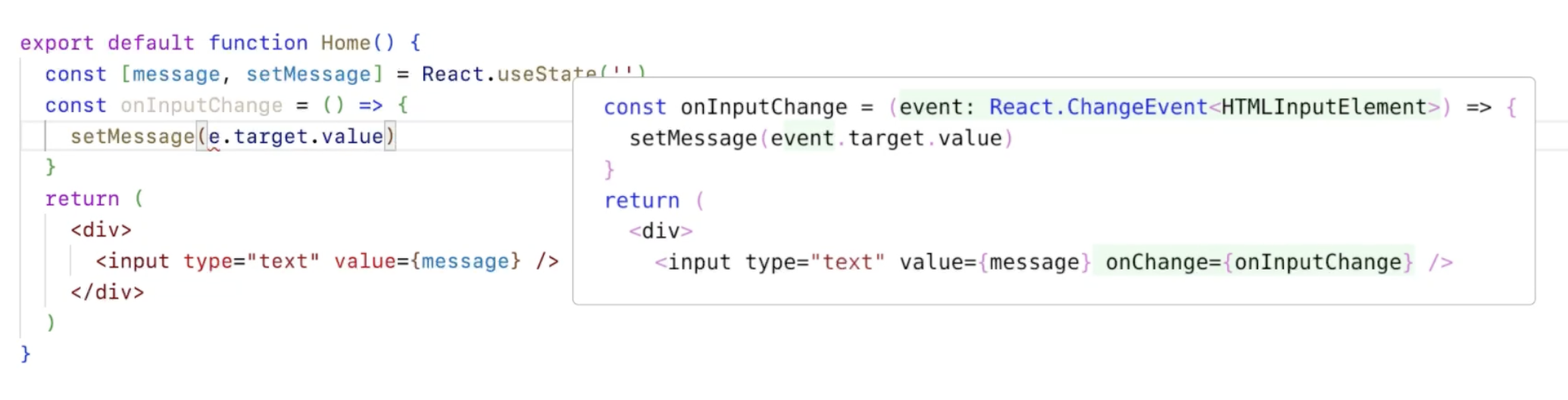
To accept a Supercomplete suggestion and apply the diff, you simply have to press “Tab,” the exact same shortcut as Autocomplete. You will only get one of Autocomplete or Supercomplete at a time, depending on what the most appropriate UI/UX is for your work at hand (e.g. if just ripping through writing a bunch of boilerplate code, Autocomplete is still nicer to speed through that work).
And the name of Supercomplete? Well, we kept the passive feel and tab completion of Autocomplete, but as one of our engineers remarked after using an early version - “it feels like a superpowered Autocomplete.” The name Supercomplete stuck.
Supercomplete in action
Here are a handful of examples of how Supercomplete can speed up your workflow, even more than just Autocomplete:
We are still being surprised with some of the suggestions Supercomplete is able to make, so if you find something exciting, take a screenshot and share it on our Discord.
How we made Supercomplete
There are many reasons why Supercomplete is not a feature you see in other AI code assistant extensions. There were a number of technical challenges across the product stack that we had to solve for:
-
Latency: Probably the king of all of the considerations is that Supercomplete, like Autocomplete, is a very latency-sensitive workload. If we produce a Supercomplete suggestion in even a second, the developer has moved on and will likely no longer find value from the suggestion. We developed methods based on speculative decoding to make use of the prior that most of the existing code is not changed, and only the parts that are part of the diffs would need to be generated a token at a time.
-
Model: Besides latency issues with the very large foundational models, open-source models and third-party APIs are very prone to repeat existing text in their response rather than predict just the diffs that we want to show with Supercomplete, so we had to do additional training to fine-tune away this behavior.
-
Prompting: We had to compress what the user was doing into a limited set of tokens that still captured the intent and past actions. Tools like
git statusandgit diffare not fast enough to run synchronously with supercomplete and do not extend to non-git users. We had to develop an ultra fast algorithm to calculate a “trajectory” of what the user is doing in an async manner, all so that we could make a representation that captures the intent within 10ms or less. -
Eval: How do you evaluate a feature such as supercomplete? We had to figure out smart judges that could measure error rates, and found ways of comparing a generated Supercomplete suggestion for a logged trajectory to the future series of edits that the developer took.
-
UX: While Visual Studio Code APIs are often limited, and did not have an in-built way to show code diffs in the manner that we thought to be the most intuitive, we got creative. We created our own HTML canvas where we could pre-render themed code snippets, compile them into images, and then render the resulting PNGs at the right location using VSCode decorations (similar to how GitLens displays git blame info).
We own the entire stack from model to UX so that we can solve the challenges necessary to deliver value additive experiences such as Supercomplete.

What’s next?
Unlimited Supercomplete is currently available in Visual Studio Code for all of our paying self-serve SaaS users (Pro and Teams). Similar to other paid features, Supercomplete does add a significant serving cost, but we are working to find a way to give our Individual users an ability to get a capped amount of Supercomplete suggestions. We will also soon be bringing this to our SaaS and Hybrid Enterprise users.
Supercomplete is a reflection of our ability to continue to innovate and expand our offerings in the editors that developers want to use.
Try Codeium Pro for free for two weeks to see the power of Supercomplete. With Pro, also try out the Autocomplete fast speed and LLM optionality with Claude 3.5 Sonnet, O1, GPT4, and more.