October brought a groundbreaking addition to Codeium with the launch of Supercomplete, a feature designed to make coding even more intuitive and assistive than ever. Alongside this major release, we’ve refined elements of the chat experience, making our toolset both smarter and more streamlined for developers. Let’s dive into the details of this month’s key highlights:
Supercomplete: A New Standard in Code Assistance
We are thrilled to introduce Supercomplete, an AI-driven modality that goes beyond Autocomplete by passively predicting developer intent. While Autocomplete efficiently suggests new text insertions at the cursor, Supercomplete anticipates broader coding actions, from edits and deletions to renaming variables and modifying schema fields.
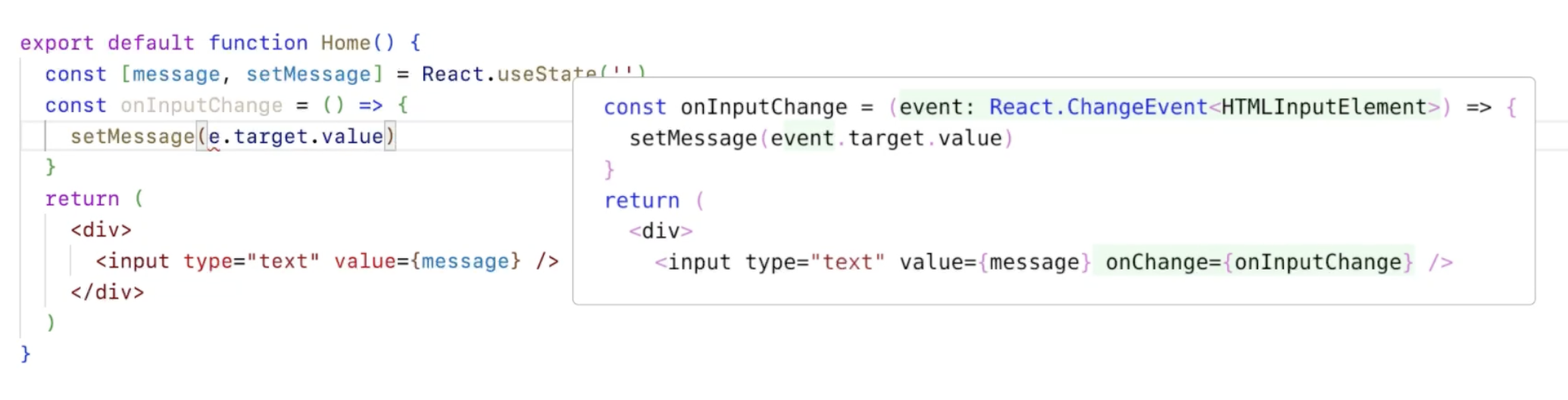
- Proactive Suggestions: Supercomplete presents edits, deletions, and insertions at the most relevant moments, beyond just cursor placement.
- Simple Activation: Accept Supercomplete’s suggestions with the same “Tab” shortcut as Autocomplete, integrating smoothly into your existing workflow.
- Enhanced Utility: Ideal for tasks like renaming variables across code, schema modifications, and adjusting constructor functions automatically, Supercomplete goes where Autocomplete cannot.
Unlimited access to Supercomplete is currently available for Pro and Teams users in Visual Studio Code, with plans to expand to additional environments soon.
Refinements to Codeium’s Chat Experience
To enhance Codeium’s chat, this month’s updates make it even more efficient for developers:
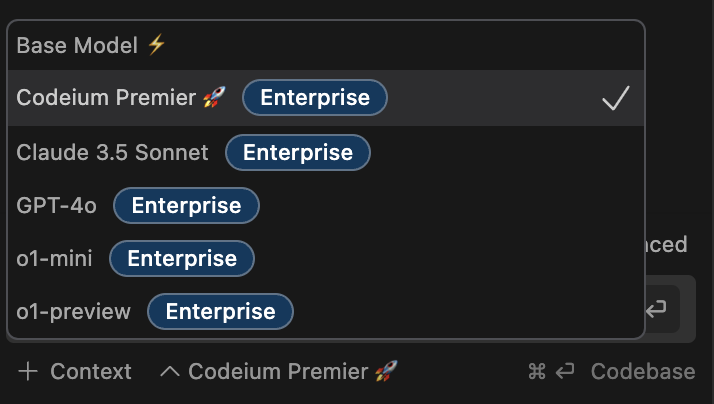
- o1 Chat Model for Pro Users: Pro/Teams users now have access to the o1 models, delivering faster, higher-quality chat responses tailored for advanced coding scenarios.
- Redesigned Conversation History: A refreshed look for conversation history brings improved navigation and a cleaner interface to the chat panel.
Codeium Enterprise Updates
Service Key
To support automation in our largest enterprise rollouts, we’ve introduced Service Keys for our Analytics APIs and User APIs, so that our users can integrate Codeium metrics into their existing BI and user management tools with this best-practice solution, enhancing security and reliability in API usage across enterprise systems. Service keys provide a best-practice solution, enhancing security and reliability in API usage across enterprise systems.
Installation Improvements
- Network Proxy Check: Automatically detects proxies that may interfere with extension communication.
- Network Test Run: A simple way to verify connectivity before installation.
Autocomplete Speed Customization
Autocomplete Speed Settings now allow developers to choose between Slow, Default, and Fast, enabling a smoother and more personalized workflow.

Chat Redesign
The chat interface has been redesigned for simplicity, prioritizing usability and making it easier for developers to access critical functions without clutter.
With the introduction of Supercomplete, enhanced Enterprise functionalities, and an upgraded chat experience, October’s updates reflect our dedication to making Codeium the ultimate coding assistant. We’re excited for developers to try out these new tools and experience a new level of productivity in their workflows. Stay tuned for more updates.