January introduced a host of new features, performance upgrades, and fixes to Windsurf and Codeium for Enterprise. This month, Cascade saw enhancements in web search, memory retention, and developer experience, while enterprise users benefited from improved analytics, expanded model configurations, and critical bug fixes. Additionally, we kicked off the year with a Launch Day, successfully rolling out three new models within just two days making Cascade the first coding agent to be able to leverage R1.
Windsurf Updates
Cascade Improvements
New Model Integrations
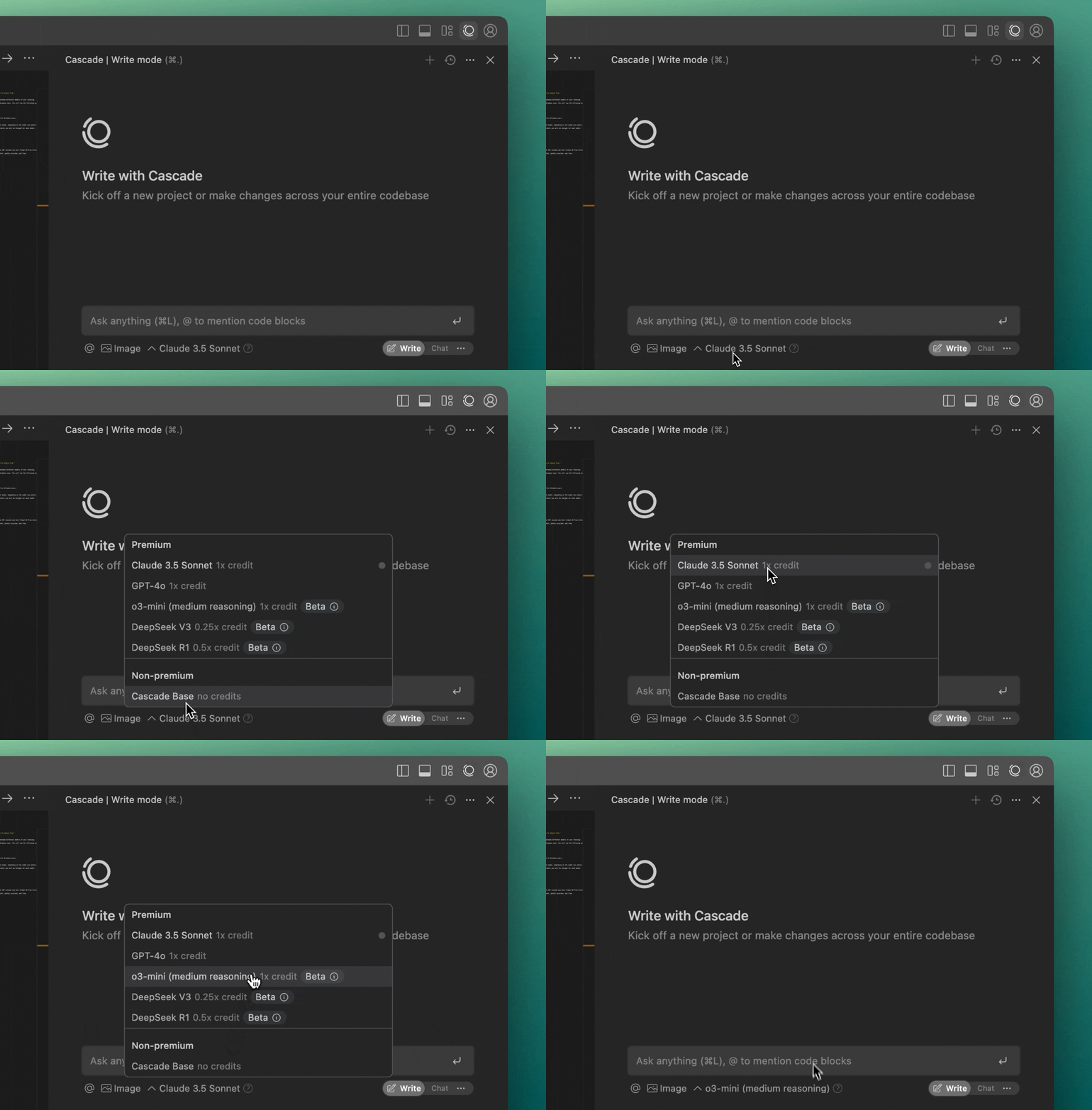
- Cascade now supports DeepSeek-R1, DeepSeek-V3, and o3-mini.
-
DeepSeek-V3 (Pro & Pro Ultimate Plans) – Uses 0.25 user prompt credits and 0.25 flow action credits per tool call.
-
DeepSeek-R1 (Pro & Pro Ultimate Plans) – Uses 0.5 user prompt credits and 0.5 flow action credits per tool call.
-
o3-mini (All paid plans) – Uses 1 user prompt credit and 1 flow action credit per tool call.
-
Cascade Web Search & Documentation Search
No more context-switching between tabs—Cascade integrates external knowledge directly into your workflow, saving time and reducing friction.
- Users can manually trigger searches using:
- URL Input – Paste a URL to provide context (useful for blog posts, docs, GitHub files, etc.).
@webcommand – Explicitly instruct Cascade to search the web.@docscommand – Search within supported documentation sites, including Windsurf’s help docs.
- Web tools can be toggled via the Windsurf Settings Panel.
- Web searches cost 1 flow action credit, with additional credits required for URL page reads.
Cascade Auto-Generated Memories (Beta)
Cascade now remembers patterns in how you work, adapting automatically to your coding style. The more you use Cascade, the more it learns, reducing repetitive explanations and personalizing AI interactions. Users can:
- Cascade now remembers context between conversations.
- Users can manually create and delete memories from the Memories Panel.
- Memories do not consume any flow action credits.
Cascade Performance & Stability Fixes
- Improved precision in code edits.
- Fixed input lag in long Cascade conversations.
- Fixed issues where Cascade edits would misinterpret
.gitignorefile changes. - Cascade Panel no longer reopens on reload if disabled in settings.
- Fixed an issue where Cascade chat mode would sometimes miss the Apply button.
- Improved handling of tool calls to reduce errors.
- Fixed bugs in the Find Tool, improving its accuracy.
General Fixes & Enhancements
We’ve been doubling down on developer productivity—eliminating friction, reducing debugging time, and enhancing how you interact with Cascade. Every new feature is designed to help you stay in the flow while coding.
Dev Container Support (Beta)
- Dev Container support for Windows is now in Beta.
- Added command to reopen the current Dev Container workspace locally.
- Attach to Running Container feature now available for any Docker container.
- Streaming CLI output in Dev Containers now shows real-time progress.
- Fixes for buffer overflow issues and container metadata handling.
Developer Experience Improvements
We know you’ve been asking for drag-and-drop functionality—so it’s finally here! Cascade now supports drag-and-drop image uploads. :)
Additionally, we’ve integrated Cascade with the Problems Tab, allowing you to send issues directly to Cascade with one click—no copy-pasting required.
Along with this, we have added enhancements to existing features and introduced new keyboard shortcuts:
- Added Explain and Fix Problem button in error popups.
- Added a per-file button in the Problems Tab to send issues to Cascade.
- Supercomplete now renders inline suggestions more expressively, making it easier to parse AI-generated completions.
- New Keyboard Shortcuts:
- Accept/Reject Cascade diff hunk:
- Accept:
Alt + Enter - Reject:
Alt + Shift + Backspace - Shortcut to explain & fix errors:
⌘/Ctrl + Shift + .
- Accept:
- Accept/Reject Cascade diff hunk:
- Cascade can now run terminal commands natively in the IDE.
- Fixed a rare issue where Reject All in the changes overview popover reverted changes but left diff zones active.
Enterprise Updates
Fixes
- VSCode Dev Spaces – Resolved a login issue that caused users to lose authentication upon refresh.
- Jupyter Notebook Autocomplete – Addressed an issue affecting IPython (Jupyter) notebook completions.
- Chat Client Stability – Fixed a sleep issue that caused unintended behavior in chat interactions.
- High CPU Usage – Resolved a performance issue in the Language Server that caused excessive CPU consumption.
Improvements
- Azure Model Authentication – Added support for certificate credential authentication in Azure models.
- Analytics Enhancements –
- User Tracking in Indexing – Now tracks and displays which users created repositories and indexes.
- User Analytics API Update – Analytics API now includes signup time and last used times for autocomplete, command, and chat.
- User Count Accuracy – Updated total users metric to reflect only active users instead of all registered users.
- PCW Analytics Enhancements – Improvements for better tracking and performance monitoring.
Miscellaneous Updates
- OIDC Authentication – Added support for OpenID Connect (OIDC) authentication.
- Timezone Support in Analytics – The Analytics API now supports custom timezones for improved reporting.
As we step into 2025, Windsurf and Codeium extension continue to evolve with improved capabilities, seamless integrations, and enhanced developer tooling. Stay tuned for more updates as we continue pushing the boundaries of developer productivity. 🚀