Users can work with Devin for days, creating huge sessions where app performance becomes a bottleneck. The largest Devin sessions took 20+ seconds to load. After loading, they continued to crawl with dropped frames and excessive memory consumption. We built Devin a brand new chat renderer to fix this.
How everyone else fixes this
Fetching and rendering 100,000+ events will tank page performance no matter how clever you are. That many events is simply too much data to transfer efficiently. Rendering those events into DOM nodes, likewise, is too much for your browser to handle. When you take into account database query speed, remounts, and resizing, it goes from slow to unusable very quickly.
Unsurprisingly, the canonical solution to this is: don’t fetch everything, and don’t render everything.
- You only fetch the most recent events and load older events when the user scrolls up into them.
- Then you only render the loaded events that are on the user’s screen. Anything off-screen becomes a blank placeholder to keep the scroll height.
Devin built a one-shot virtualization of this, but…it wasn’t great.
We needed to do better
The first big issue with our virtualizer was scroll jank.
As events loaded in or we rendered new rows, the height of elements on screen would change, moving the content you were reading. Since we render new rows whenever something moves on or off screen, this jank happened on every scroll. Streaming made it worse still — the chat would move under you even when you weren’t scrolling.
Even without any layout shift, load times were often worse than before. Accessing any part of the session except the preloaded tail became annoyingly slow. You’d scroll, hit a spinner, wait, and then scroll again, and you’d have to repeat over and over until you found what you wanted. For very long sessions, getting to the first message often took minutes of scrolling.
What we really wanted was for users to feel like the whole session was already on their machine, but with fast load times and less performance impact. You just load into a session and scroll to what you want. Seeing a loader when you scroll is fine, but we didn’t want to make any trade-offs with app polish or access to specific parts of the session.
To do this, we had to take a unique approach to fetching data and stabilizing our virtualizer.
Loading: filling in the map
For users to scroll to the part of the chat they want to load, they need “something” to scroll. Since we can’t load the entire chat, we load just enough to let us give users an “outline” of the chat.
You just need the type of each event; from that you can paint a skeleton of the entire chat that approximates the real chat’s height and shape. Concretely, this outline is just a big array of message types, from which we render a big array of skeleton components. This query stays fast even with huge sessions because it only scans an index (no expensive JSON materialization) and we return very little data (just an array of types).
Once a user scrolls to an unloaded section of the chat, we fill in the outline with an island of events at their location. We get the event IDs of the skeletons on screen plus a buffer in either direction, so content is usually loaded before it scrolls into view. Then we fetch the detailed events so we can swap the skeletons for real messages.
With loading done, the challenge becomes swapping in the real messages without jank.
Virtualization without jank
Say you’re at the bottom of a chat and scroll up until you see some skeletons. Once those turn into real messages, they’ll swap from estimated to real height, which pushes down the other messages on screen. This jank gets even worse in a complicated app like Devin with dynamic message types (inaccurate estimates) and streaming (frequent chat changes).
The goal is to keep anything that the user might have been looking at on screen fixed, even as row heights change around it. At a basic level, this is simple:
- If rows resize below what you’re looking at, no problem — our scroll position is a measure from the top of the chat.
- If rows resize above what you’re looking at, measure the number of pixels gained or lost, and subtract that from the scroll position.
In practice, this becomes messy quite quickly. You have to ensure only one group of rows loads in at a time and offset the height delta before paint. And the “what you’re looking at” mentioned above is hard to figure out. Is it a row on screen? If so, which one? What if there are no rows on screen and it’s all skeletons? What if there are skeletons interspersed with loaded rows?
To solve this, we came up with a set of rules that let us figure out “what you’re looking at”, even in these trickier situations. We choose one row to be an “anchor” (the thing whose position on screen cannot change), according to these simple rules:
- If there are visible loaded messages, choose the topmost message.
- If there are only skeletons on screen, choose the topmost skeleton.
Then, we just have to preserve the position of the top of the anchor relative to the viewport. Once the browser has computed layout for the new rows, we measure the delta from before those rows rendered, and apply that as a scroll offset before the browser paints it to the screen.
Notably, this does not address the edge case of skeletons interspersed with loaded rows. In this scenario, the user might have been looking at any of the rows on screen, and we cannot keep them all stable. So instead, we prevent these situations from arising entirely.
Whenever a load would result in an “islet” (a small enough group of skeletons that you could see both ends of it in the viewport at once), we extend the load to cover the whole islet. This keeps all load situations on the happy path, so we never have to compromise on what part of the screen will shift.
Making agents good at front-end polish
Most of these improvements were driven by finding failure cases and giving them to Devin. Out of the box, Devin wasn’t great at figuring out what was going on. Computer use just isn’t good enough to understand the UI issues that humans understand intuitively.
Instead, we had Devin build a virtualization debugger that combined visualizations of the chat state (for humans) with extensive logging of every relevant action (for agents). Whenever a new bug was reported, we could load the session and either intuit the issue from the visualization or give Devin the logs so he could inspect it.
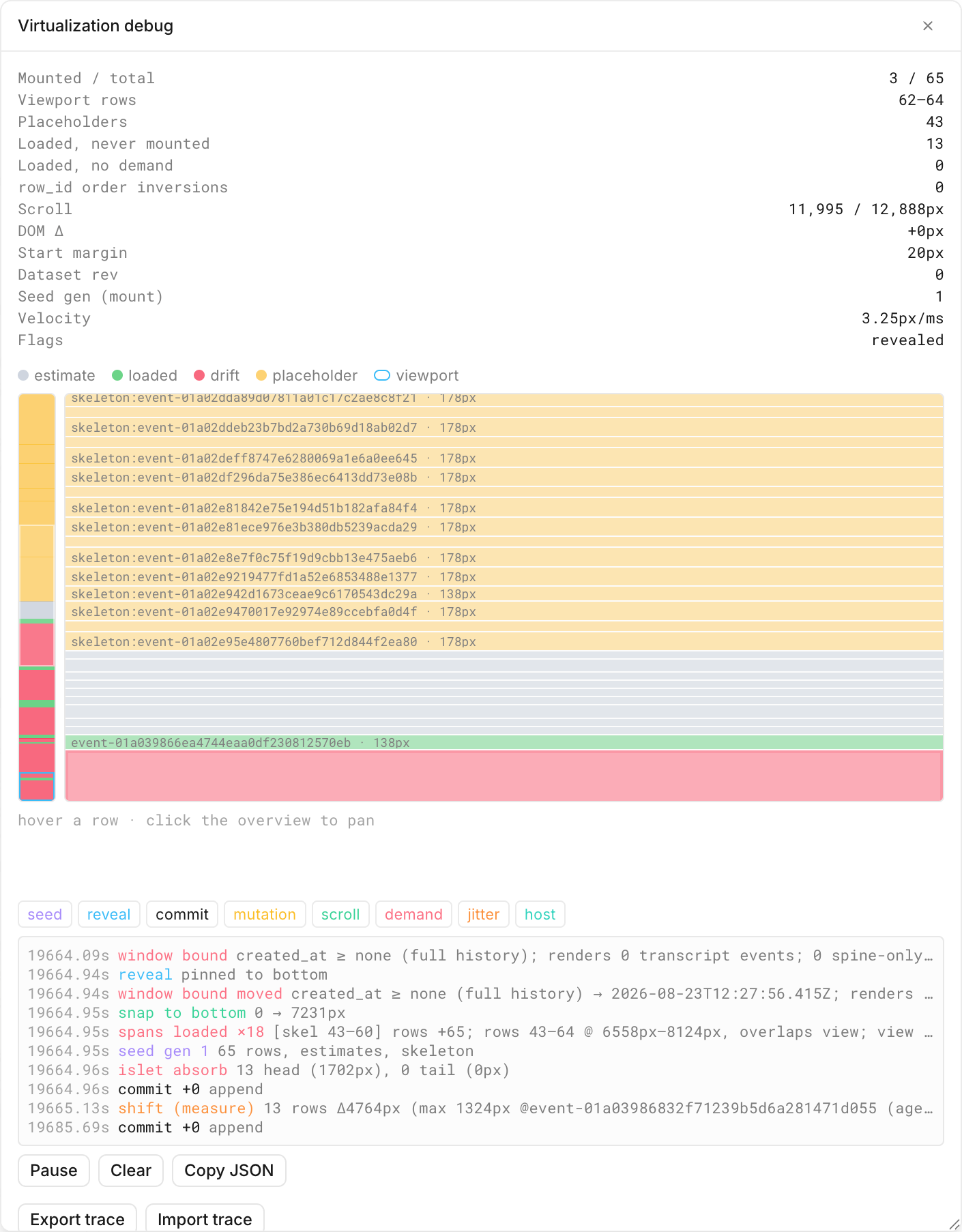
Towards the end of the project, we would gather large batches of failing session logs and give them to Devin overnight. He would come up with several fixes in parallel and test them with the debugger on his computer to validate that the issue would not reproduce. Then we’d come back in the morning to validate his work while we set him onto the next batch of broken logs.
We were excited by what Devin could do when we gave him the tools to see what humans see and validate that his fixes would work without a human in the loop.
Agents have a tendency to stick to their existing tools (like computer use) rather than setting out to build new ones (like custom debuggers). So, for the time being, it’s up to the engineers running them to push them in an ambition-maximizing direction.
Conclusion
The new chat renderer significantly improves the user experience for large sessions. Chats load 70% faster, and layout shift decreased by 86%. Users can now seamlessly scroll to any position in even the largest chats with hundreds of thousands of messages.
These changes, along with dozens of other small details, are live in the app today.
At Cognition, we’re obsessed with building the best coding agent in the world. If this mission resonates with you, come join us — we’re hiring product and infra engineers.